
Features List
APPLICATION FEATURES
Configurable
Easily serve multiple clients from a single instance of Project Planner
Customize your layer tree, POP tables, toolbar buttons, data content, related document lists, and more!
White Washing
Make it look and feel like your own! The application can be fully white washed to integrate seamlessly into your existing system.
Extendable
This application is supported by a proprietary back end code base owned by ENDpoint Ventures. As the original developers of the system the ENDpoint Development team has the ability to customize anything within the application. Talk to your product manager today about your custom web mapping needs.
MAP FEATURES
LEARN MORE
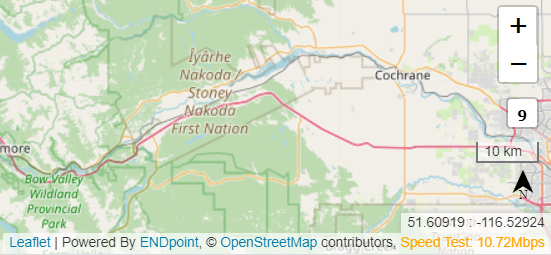
Annotation Legally required and custom annotation which gives credit to data providers and base systems.
Speed Test A live internet speed test which reports the users current internet speed. This is an important troubleshooting tool.
Zoom Classic map zoom +/- tool
Zoom Scale Reports the users current zoom scale
Scale Bar Shows the users current scale in units appropriate to the current map extent which will appear in the PDF generated map print outs
North Arrow Classic north arrow which will appear in the PDF generated map print outs
Current Location Displays the users current curser location in Latitude and Longitude
ASSET MANAGEMENT
LEARN MORE
POP TABLES
Performance Optimized Pop Up Tables are Project Planner’s custom solution to displaying tabular data. Experience exclusive performance even with thousands of records. Pop tables are fully customizable, putting you in the drivers seat.
Here are just a few of our favorite POP table features:
Direct to Database Editing
Custom multi column filtering
In line or full view editing
Table Export
DOCUMENT MANAGEMENT
Although the application is fundamentally a web map, it contains a fully featured versioned document management system.
TOOL BAR


Layer Tree
Easily serve multiple clients from a single instance of Project Planner
Customize your layer tree, POP tables, toolbar buttons, data content, related document lists, and more!

Box Zoom
Allows user to select area on the map to zoom into.

User Layers Tool
Allows the user to upload, style, and buffer their own vector data, supports KML, GeoJason and shapefiles. Layers appear at the bottom of the Layer Tree.
Let us meet..
When you talk, we listen. When you work with us you matter. Work directly with the founders and get real support from real people. Support is not an add on, it is always included. Let's build something awesome together!
Created with systeme.io
Contact Us
We HATE spam. Your email address is 100% secure